Email is usually the first channel a team connects, because nothing has to change for customers: they keep writing to the address they already use.
FirstReply reads the mailbox over IMAP and sends over SMTP. It does not replace your mail provider, it connects to it.
What you need
- The address itself, for example
support@yourcompany.com. - IMAP host and port (993 with SSL is the usual pair).
- SMTP port (587, or 465 for implicit SSL).
- A password. On Google Workspace and Microsoft 365 this must be an app password, not the account password.
Connecting
Add an inbox of type Email under Settings → Configuration → Inboxes.
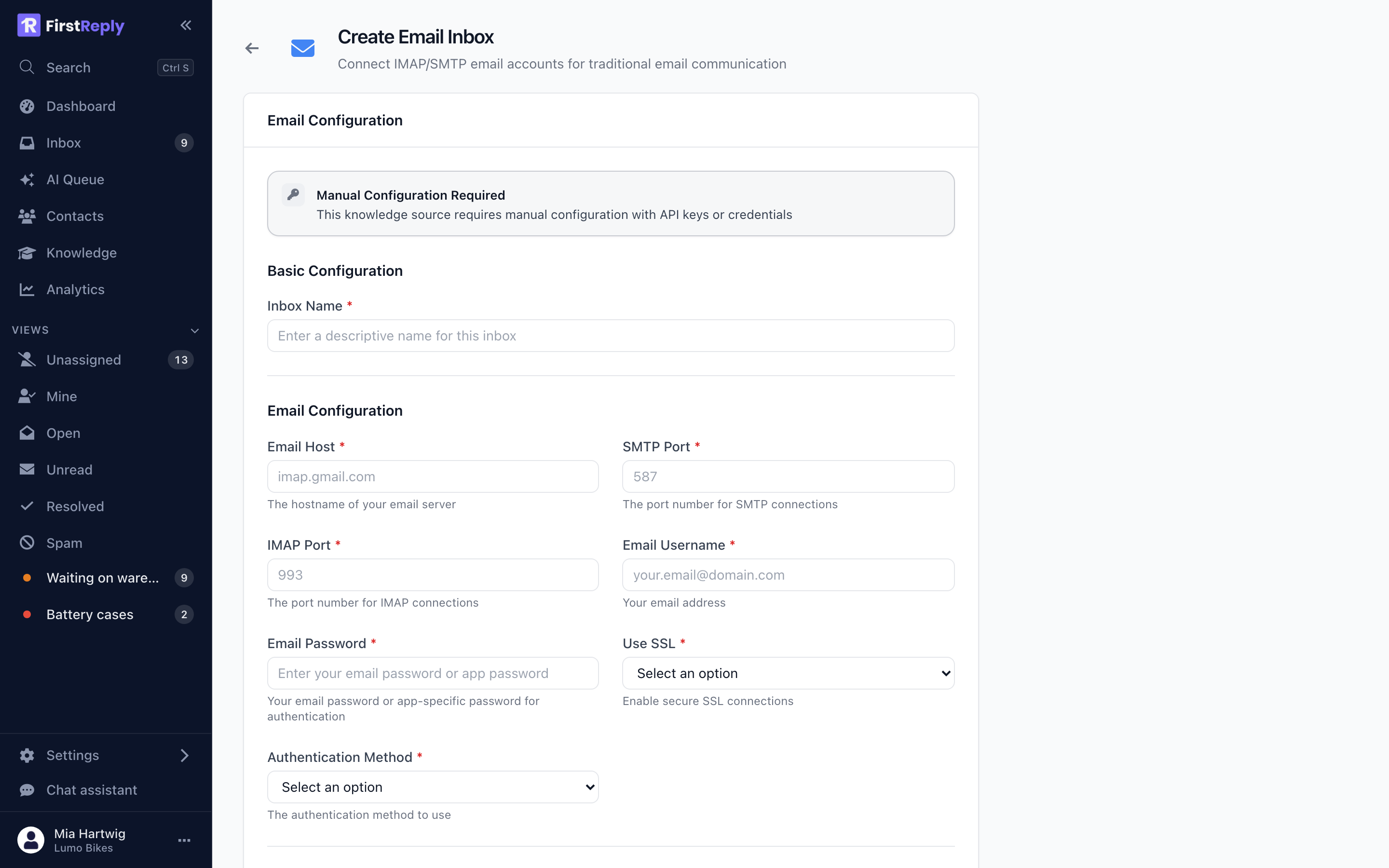
| Field | What to enter |
|---|---|
| IMAP host | imap.yourprovider.com |
| SMTP port | 587, or 465 for implicit SSL |
| IMAP port | 993 for SSL, 143 without |
| The full address, which is also the username on most providers | |
| Password | The mailbox password or app password |
| Use SSL | Yes, unless your provider genuinely does not support it |
| Authentication method | Plain or Login, whichever your provider expects |
Use Test connection before saving. It performs a real login on both protocols and tells you which one failed, which is faster than discovering it from a silent inbox an hour later.
The password is encrypted before it is stored and is never displayed again. On a later edit the field stays empty; leave it empty to keep the existing password.
Common providers
Google Workspace — imap.gmail.com, IMAP 993, SMTP 587. IMAP must be
enabled in the account's settings, and you need an app password with 2-step
verification switched on.
Microsoft 365 — outlook.office365.com, IMAP 993, SMTP 587. IMAP is
disabled by default on many tenants; an administrator enables it per mailbox.
Everyone else — the values are in your provider's documentation under "IMAP settings". If SMTP fails on 587, try 465.
How messages arrive
FirstReply polls the mailbox and imports new messages, usually within a minute. It does not delete anything: the mail stays in your mailbox exactly as it arrived, so nothing is lost if you disconnect the inbox later.
Replies to an existing thread join the existing conversation. Threading follows
the standard mail headers (Message-ID, In-Reply-To, References), which is
what every mail client uses, so a customer replying from Gmail lands in the
right place. A reply on a closed conversation reopens it.
Sending
Replies go out over SMTP from the connected address. They carry both an HTML and a plain-text version, so they render correctly in every client.
Email is the only channel with no length limit, full rich-text formatting and attachments. Everything you can do in the editor survives the trip.
Signature
The signature is set on the inbox and appended to every outgoing message from it. Setting it per inbox rather than per person keeps replies consistent regardless of who sends them, and means the assistant's replies look the same as your team's.
Keep it short. A five-line signature on a two-line answer is mostly noise.
Automatic replies from the other side
Out-of-office and other automated replies land in the inbox like any message. Give them their own classification with automatic close on, and they close themselves without ever reaching the queue.
Troubleshooting
The inbox is unhealthy. The credentials no longer work. The usual causes are a rotated password, an expired app password, or a provider disabling IMAP. Re-enter the password and test the connection.
Messages arrive but replies do not send. IMAP works and SMTP does not. Check the SMTP port and whether your provider requires a different host for sending.
Nothing arrives at all. Confirm the mail is actually reaching the mailbox, and that a rule is not filing it into a folder before FirstReply sees it — only the inbox folder is read.