The AI Queue
The inbox shows everything. The AI Queue shows the part that needs a human today, grouped by why.
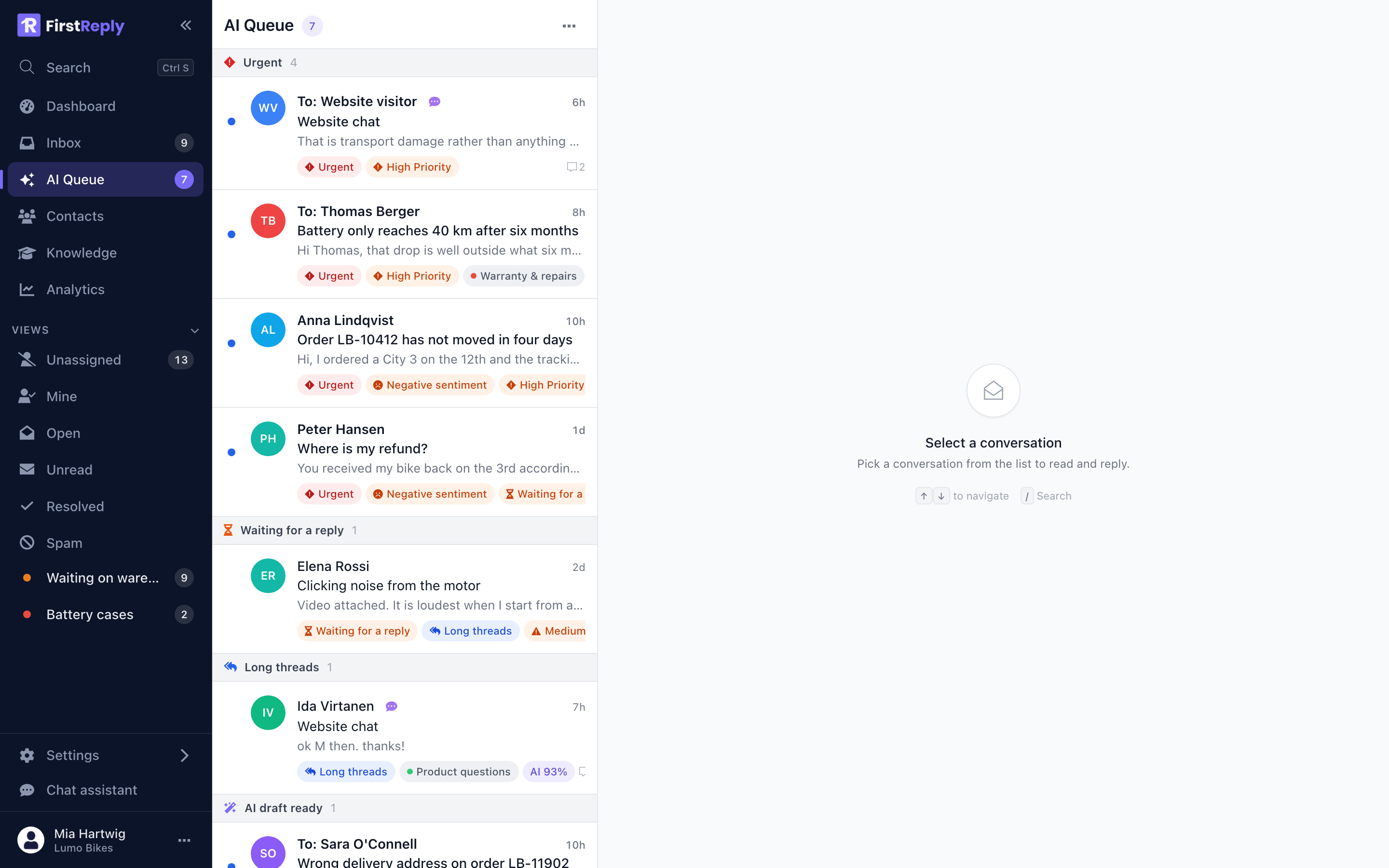
It exists because "sort by newest" is the wrong order once a queue is more than a screen long. An angry customer from yesterday matters more than a straightforward question from ten minutes ago, and only one of them is at the top of the inbox.
The signals
A conversation appears in the queue when it matches at least one signal. It can match several, and then it carries several chips.
Urgent — priority is High or Critical. Priority is set by hand or automatically when the assistant hands a conversation over because it could not answer.
Negative sentiment — the latest customer message reads as unhappy. This is the signal that surfaces the frustrated customer whose message contains no exclamation marks and no obvious keywords.
Waiting for a reply — the last message is from the customer and it is more than 24 hours old. Nothing else needs to be wrong; the conversation has simply been sitting.
Long threads — three or more messages and the last one is from the customer. Long threads are where problems hide: something has not been resolved in three attempts.
AI draft ready — the assistant prepared a reply and is waiting for someone to review and send it. This is the group you work through when you have introduced draft-only automation.
Working the queue
Groups are ordered by how much they should worry you: Urgent first, then Negative sentiment, then the waiting and long threads, then drafts.
The sensible routine is top to bottom, once in the morning and once in the afternoon. Everything in Urgent and Negative is a conversation where the delay itself is now part of the problem.
Drafts are the fastest group: read, adjust, send. A queue with twenty drafts is twenty conversations that need a minute each rather than ten.
Why a conversation left the queue
A conversation drops out when the reason it was there stops being true: someone replied, the priority came down, the draft was sent, the conversation closed. Nothing is dismissed by hand, so the queue cannot be gamed into looking empty.
Using it with the AI
The queue is most useful in the middle ground, where the assistant handles a real share of the volume but not all of it. In that setup:
- Automatic replies clear the routine questions before anyone sees them.
- Drafts collect in the queue for the categories you are still watching.
- Everything the assistant refused to answer arrives as Urgent, because hand-over sets high priority.
The result is a queue that is mostly exceptions, which is the queue worth having a person look at.
If your queue is instead full of ordinary questions, the knowledge base is too thin rather than the queue being wrong. See The knowledge base.