Views and filters
The inbox shows everything by default. Filters narrow it; views save a filter so you can come back to it in one click.
Filtering
Open the filter panel with Filter above the conversation list.
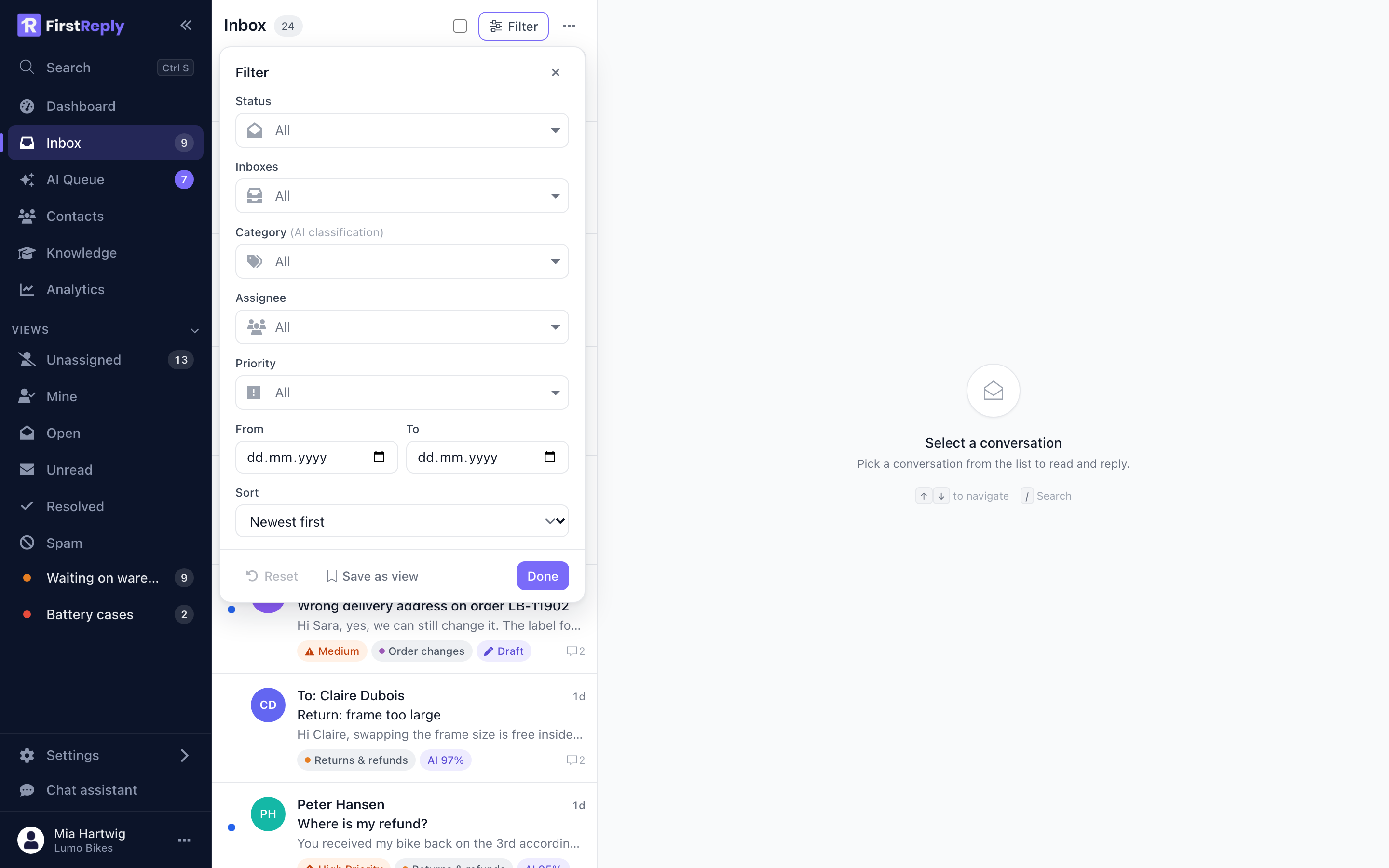
| Filter | Options |
|---|---|
| Status | All, Unread, Read, Open, Closed |
| Inboxes | One or more connected channels |
| Category | One or more classifications |
| Assignee | A team member, or nobody |
| Priority | Normal to Critical |
| From / To | A date range on the last activity |
| Sort | Newest or oldest first |
Filters combine: Open, Shipping, unassigned, high priority is one filter, and it is the sort of thing worth saving.
The active filter is shown as a chip above the list, and Reset clears everything.
Saving a view
Save as view at the bottom of the filter panel turns the current filter into a named view. Give it a name and a colour.
The view appears under Views in the sidebar with a live counter, and behaves exactly like the built-in ones. Views are personal: yours do not appear for your colleagues.
Two that most teams end up with:
Waiting on someone else. Open conversations in the categories that depend on another team — the warehouse, the workshop, finance. It is the list to walk through on a Monday morning.
My urgent. Assigned to you, priority High or above. The list that decides what you do next.
Editing and removing
Right-click a view in the sidebar, or open it and change the filter, to rename, recolour or delete it. Deleting a view deletes only the saved filter, never any conversation.
Views or search
Use a view for a question you ask repeatedly: "what is unassigned in shipping". Use search for a question you ask once: "what did we tell that customer about their battery".
Views are structural filters — status, category, assignee. Search is about content. When you need both, filter first and then search inside the filtered list; the two combine.
The standard views
The built-in views cannot be edited or removed:
| View | Equivalent filter |
|---|---|
| Unassigned | Open, no assignee |
| Mine | Open, assigned to you |
| Open | Status is not closed |
| Unread | Nobody has opened it |
| Resolved | Closed |
| Spam | Marked as spam, hidden everywhere else |