Classifications
A classification is a category for incoming messages: Shipping, Returns, Billing, Technical support. Sorting is only half of what they do. The other half is control: each category carries its own rules for what the assistant may do with a message that lands in it.
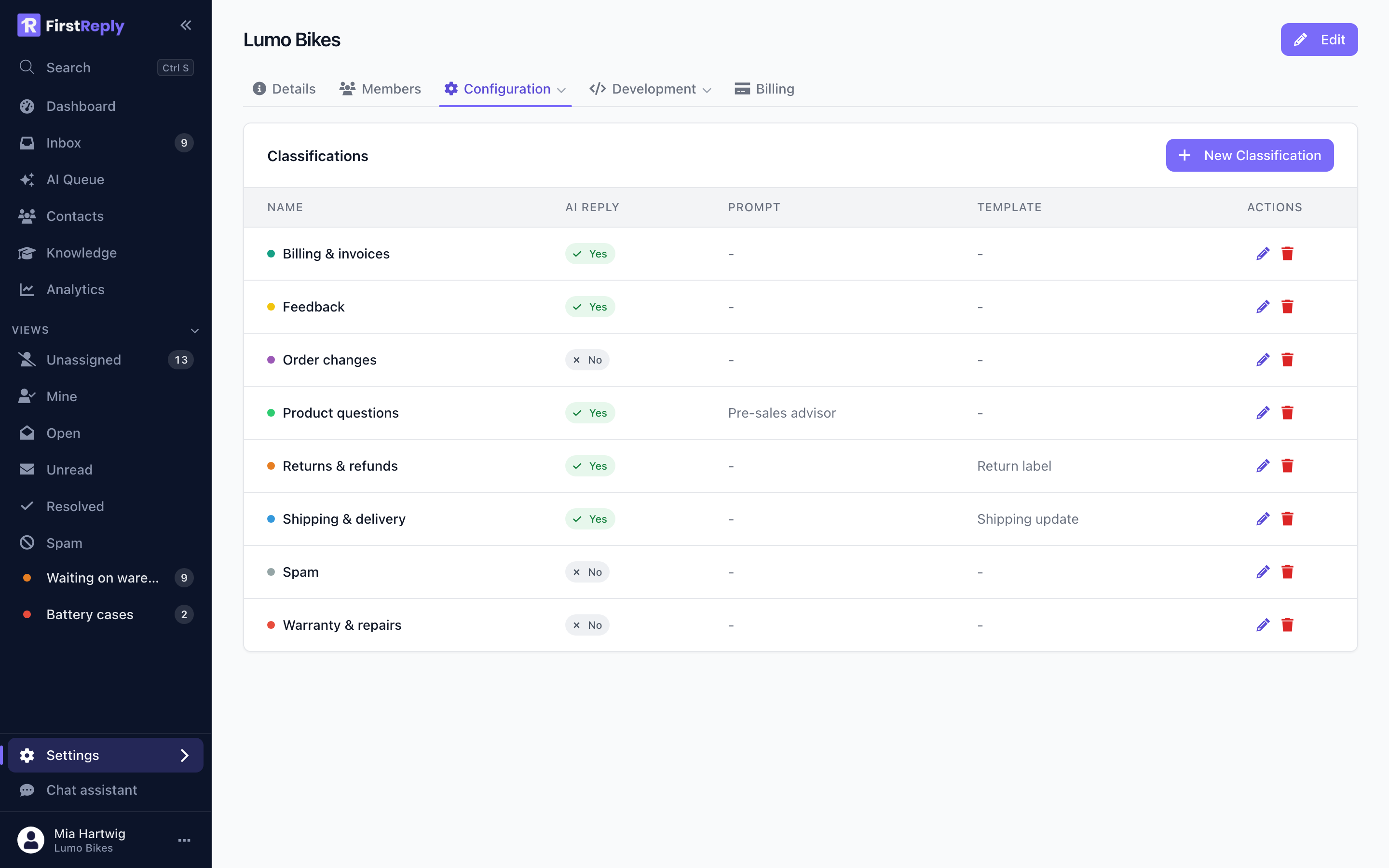
Find them under Settings → Configuration → Classifications. Creating and editing them needs the Manager role or higher.
What a classification holds
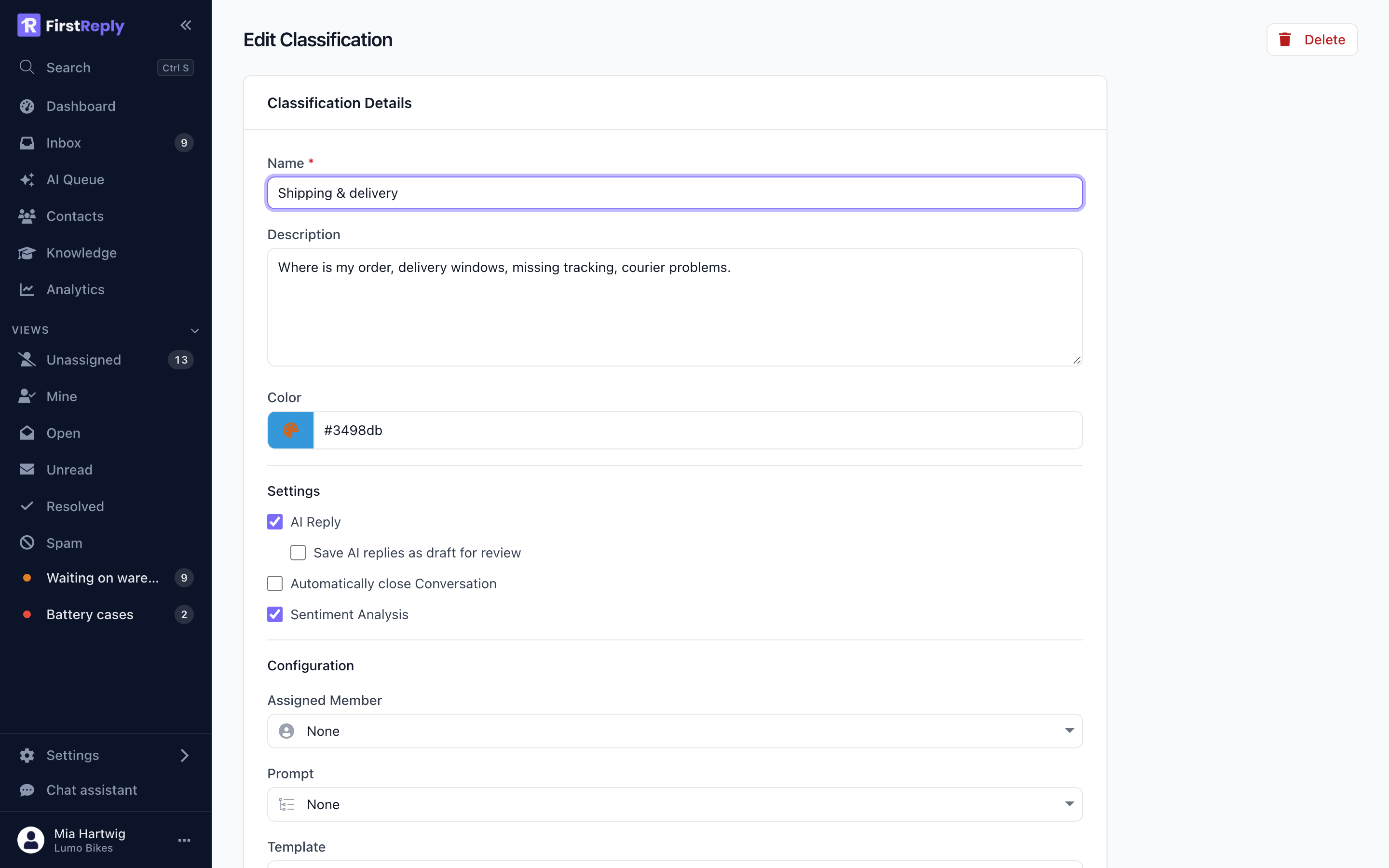
Name — what your team sees on the conversation. Keep it short.
Description — what the assistant reads when it decides where a message belongs. This is the most important field on the form and the one most often left empty. Write it as instructions to a new colleague:
Where is my order, delivery windows, missing tracking, courier problems. Not: returns, which have their own category.
A one-word description gives the assistant nothing to work with, and misclassification follows.
Colour — the chip colour in the conversation list.
Automatic reply — when on, the assistant answers messages in this category by itself.
Draft reply — when on, it writes the answer but leaves it in the editor instead of sending. Drafts show up in the AI Queue.
Automatic close — closes the conversation after the assistant answers. Sensible for Feedback and Spam, rarely right for anything a customer might follow up on.
Sentiment analysis — reads how the customer feels and surfaces negative messages in the AI Queue.
Template — the template to use for answers in this category, when the answer should be fixed text rather than generated.
Prompt — an extra prompt with writing instructions for this category only.
Default assignee — every conversation in this category is assigned to that person on arrival. This is how you route warranty cases to the person who handles warranties without anyone triaging manually.
Designing the catalog
Between five and ten categories covers most support teams. Fewer and the routing does not help; more and the boundaries blur, which makes both the assistant and your team less accurate.
Split by what happens next, not by topic. Returns and Refunds are one category if the same person handles both with the same steps. Battery fault and Cosmetic damage are two if one goes to the workshop and one does not.
Give spam its own category with automatic close on. It keeps the noise out of the queue without deleting anything.
Write the descriptions as boundaries. Say what belongs and what does not. The categories that get confused are the neighbouring ones, and one clause ("not: refund status, that is Returns") fixes most of it.
No classification
NONE is a legitimate outcome. When nothing in the catalog fits, the assistant
records that and its reason instead of forcing the message into the nearest
category. The conversation shows as unclassified and waits for a person.
A steady trickle of unclassified conversations is healthy. A flood means the catalog has a hole, and the unclassified conversations tell you what it is.
Confidence
Every automatic classification carries a confidence between 0 and 1, shown as a percentage on the conversation.
Below the workspace threshold, the classification is recorded but no automatic reply and no automatic close happen, whatever the category says. Low confidence conversations therefore behave as if the category were fully manual, which is the intended safety behaviour.
Manual classification
Anyone can change a classification from the conversation menu. When a person does:
- The AI's reason and confidence are cleared, because they no longer describe what the conversation is filed as.
- The conversation becomes a verified example. Verified examples weigh more than AI-classified ones when the assistant classifies similar messages later.
Correcting a wrong classification is therefore the cheapest way to improve the assistant. It takes two clicks and it teaches.
Turning off classification entirely
A workspace can disable automatic classification under Workspace settings. Conversations then arrive unclassified and your team files them by hand. The AI still drafts and answers where you ask it to; it just stops sorting.